The Problem I Kept Running Into
Every time I went out for a long run, I needed at least three apps. One for pace. One for my intervals. Another to figure out if I was going to make it back before dark. And half the time, I was somewhere without cell service, which meant the apps that needed a connection were useless at exactly the moment I needed them most.
I've been building software for twenty years. At some point I stopped complaining about the problem and started solving it.
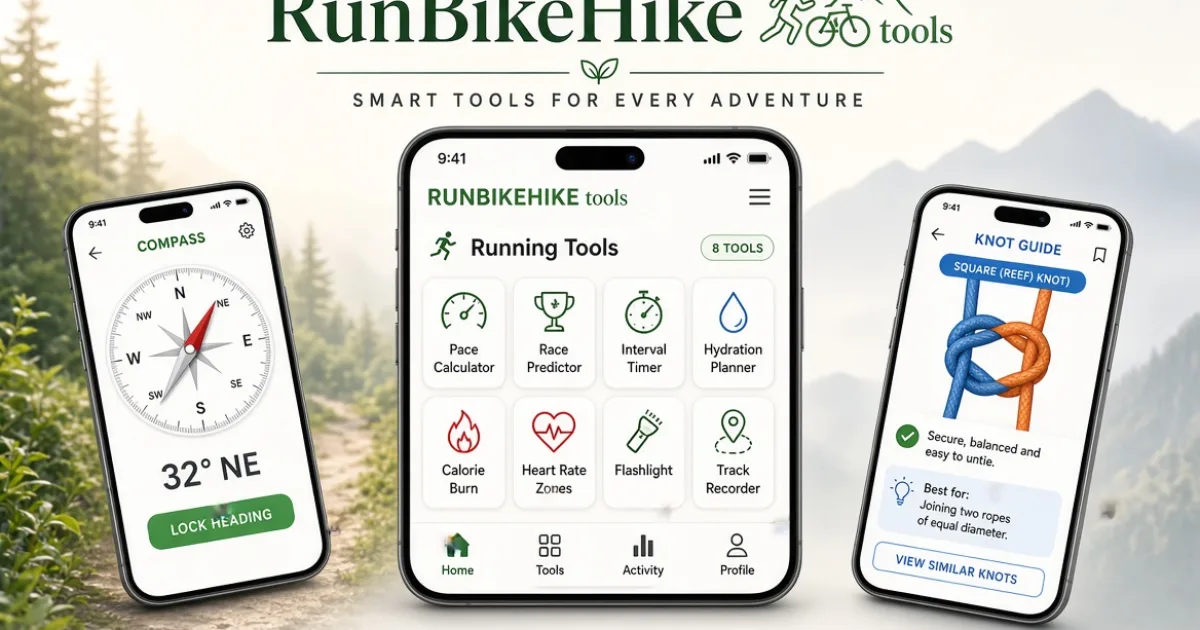
The result is RunBikeHike Tools — a free iPhone app with 15 calculators, timers, and field tools for runners, cyclists, and hikers. Every single one works completely offline. No account. No GPS tracking. No subscription. Download it once and use it on every run, ride, and hike.
Here is what is in it and why I built each piece the way I did.
The Running Tools
Pace Calculator
This sounds simple, and it is — but the execution matters. You enter any two of three variables (distance, time, or pace) and get the third. Race presets for 5K, 10K, half marathon, and full marathon are one tap away. The inputs are remembered between uses, which matters when you are mid-training-block and checking the same calculation daily.
I built this because every pace calculator I found was either buried in a fitness app I did not want, required a subscription to unlock, or did not remember my inputs. A pace calculator should take three seconds to use. This one does.
Race Predictor
Enter any recent race result and the app projects your expected finish times at other distances using the Riegel formula — the same algorithm coaches have used for decades. Run a 25:00 5K and want to know what to expect at your first half marathon? The calculator gives you a realistic target and explains what it would take to achieve it.
The honest version of this tool also shows you what is required per mile. Seeing that a 2:00 half marathon requires a 9:09 per mile average makes it concrete in a way that a finish time alone does not.
Interval Timer
Work periods, rest periods, sound cues, vibration cues, unlimited rounds. The timer runs in the background so your screen can go dark between intervals. If you have ever tried to run intervals with a general-purpose timer app while also trying to track your route, you understand why a dedicated interval timer that stays out of your way is worth having.
Trail Pro users get unlimited custom presets — save your 6×800m workout, your 30-20-10 pyramid, your Fartlek blocks, whatever you use regularly.
The Biking Tools
Speed, Distance, and Time Solver
Enter any two and solve for the third. How long does a 42-mile ride take at 14 mph average? How fast do you need to average to finish a century in under 6 hours? What distance can you cover in 90 minutes at your typical pace? The solver handles all three scenarios from one interface.
Tire Pressure Guide
This one required actual research. Optimal tire pressure depends on your weight, your tire width, your rim type, and the surface you are riding. The app asks for all of these and returns specific front and rear PSI recommendations. Not a generic range — a specific number for each end of the bike, adjusted for rider weight distribution.
Most cyclists either use whatever pressure they last set or pick a number in the middle of their tire's printed range. Dialed tire pressure makes a measurable difference in rolling resistance and flat prevention. This tool takes about 20 seconds to use.
Gear Ratio Calculator
Enter your chainring size, cassette cog size, and wheel diameter and the app calculates your gear ratio, gear inches, and speed at any cadence you specify. Useful when evaluating component upgrades, comparing drivetrains, or understanding why a certain gear feels the way it does. Trail Pro unlocks a full drivetrain chart showing every combination in your setup.
The Hiking Tools
This is where I spent the most development time, because hiking has more decision points that actually affect safety. Getting the pace calculator wrong costs you a minute. Getting your turnaround time wrong costs you a headlamp and a search and rescue call.
Hiking Time Estimator
Uses Naismith's Rule — the standard mountaineering formula — adjusted for your fitness level and pack weight. Enter distance, elevation gain, how fit you are (beginner, intermediate, experienced), and how heavy your pack is. The app returns a realistic time estimate, not an optimistic one. It also tells you what time you need to leave to make it back before dark if you enter your start time.
This tool has a "Start Time" mode that works backward from sunset: tell it when sunset is and how long the hike takes, and it tells you the latest you should leave the trailhead. I built this after one too many evenings finishing a hike in the dark.
Turnaround Alarm
Set a turnaround time and the app will alert you when you hit it, regardless of whether your screen is on. The sunset-aware version uses your current location to calculate today's sunset time and sets the turnaround alarm automatically based on your estimated hiking time. You head out, the alarm fires when you need to turn around, and you make it back with daylight to spare.
This is the tool I am most proud of. It solves a real problem — the "just a little further" problem — in a way that is actually useful in the field.
Compass
Uses the iPhone's magnetometer directly. No internet required. No GPS required. Points north and gives you a real heading in degrees. Red pointer north, cardinal and intercardinal directions, degree display. It works in airplane mode. It works underground. It works everywhere the iPhone's physical sensor works.
Most people do not realize their phone has a compass that works without any connection. This puts that sensor in a clean, readable interface you can actually use when you need it.
Knot Guide
Step-by-step illustrated diagrams for the essential outdoor knots: bowline, clove hitch, figure-eight, square knot, sheet bend, taut-line hitch, trucker's hitch, and prusik. Each knot has a use-case description, the step sequence, and — in Trail Pro — the complete 8-knot library. Fully offline. Works when your phone is in airplane mode on a mountain.
Flashlight and Strobe
Steady beam, strobe, and SOS beacon using the phone's rear flashlight. Red mode reduces the intensity to preserve your night vision when reading a map or checking gear in the dark. The SOS pattern is standard Morse — three short, three long, three short — useful to know even if you hope to never need it.
Pack Weight Checker
Enter your body weight and your pack contents by category and the app calculates your total pack weight, your pack weight as a percentage of body weight, and gives you a rating (ultralight, light, acceptable, heavy, too heavy). The standard recommendation for day hiking is under 20% of body weight. The app also includes the 10 Essentials checklist — a classic wilderness safety framework — so you can verify you have everything before leaving the trailhead.
The Universal Tools
GPS Track Recorder
Records your live route with distance, pace, and elevation. The map and recording work without a cell signal — GPS hardware on an iPhone works independently of the cellular connection. You can record a hike in a wilderness area with zero bars and still get a complete track. Trail Pro users can export the track as a GPX file and download or share it.
Hydration Planner
Duration, temperature range, exertion level, and altitude → exactly how much water to carry. Returns the answer in liters, ounces, and number of standard water bottles. Also flags when you should add electrolytes (anything over 90 minutes of sustained effort). I built this into the app because it is the same calculator on the website and people use it constantly — the phone version is faster to access on the trail.
Calorie Burn and Heart Rate Zones
MET-based calorie estimates for running, hiking, and cycling at different intensities. Heart Rate Zones calculates all five zones from your age and optional resting heart rate using the Karvonen formula. Both tools are in the app because knowing your zones changes how you train, and having the reference in your pocket means you can check it whenever you need it.
Trail Pro: One-Time $2.99
The app is completely free. No features are locked away behind a monthly subscription. Trail Pro is a one-time purchase that removes ads and unlocks the power-user layer: training paces from any race result, split tables and pace bands, a fueling planner for long efforts, GPX export for the track recorder, the full 8-knot library, a gear closet, custom checklists, a trip log with pace history, unlimited custom interval presets, and a full drivetrain gear chart.
I priced it at $2.99 because that is what a coffee costs and because I wanted the price to be genuinely easy to say yes to. No subscription. Ever. You buy it once and it is yours permanently, including all future updates.
Why Everything Is Offline
I built every tool to work without any connection because that is when you actually need them. The pace calculator you want to check mid-run. The compass you need on a ridge. The turnaround alarm that fires at mile 7. These are not desktop use cases. They happen in the field, often somewhere without cell service, always somewhere you do not want to fumble through a connection error.
No account, no sign-in, no cloud sync, no analytics with personal data. Your GPS tracks are stored on your device. Your settings are stored on your device. Nothing leaves your phone unless you choose to export it.
Download It
RunBikeHike Tools is free on the App Store. Search "RunBikeHike Tools" or use the direct link below. If you try it and have feedback — a tool that doesn't work the way you expect, a feature request, a bug — the support page links back here and I read everything.
🍎 Download on the App Store — Free
And if you want the full breakdown of what is in the app along with screenshots and a comparison of the free vs. Trail Pro tools, the app page here on RunBikeHike.us has everything.